AadhaarVerify
UIDAI / NIC Signature Validation

మీ ఇ-ఆధార్ PDF పై అధికారిక గ్రీన్ టిక్ పొందండి

Cryptographically validates the official UIDAI digital signature and embeds Long-Term Validation (LTV/DSS) data so standard PDF software displays a native green tickmark.

Signature Valid
Native standard PDF software green tick embedded
Learn How It Works
Zero Storage / Fail-Closed Instant Verification CCA India Cert Chain
Republic of India • e-Aadhaar
No file selected
Ready to verify document signature
Fix Aadhaar Signature Validity Unknown Error

Stop struggling with "Aadhaar card signature not verified" warnings.

Aadhaar Signature Verification Green Tick vs Yellow Question Mark

The Problem

When you download your e-Aadhaar, you often see a yellow question mark with the text "Validity Unknown". This happens because your PDF reader doesn't inherently trust the Indian government's root certificates (CCA India). Attempting to fix the invalid digital signature on your Aadhaar card manually requires navigating complex certificate trust settings.

The Instant Solution

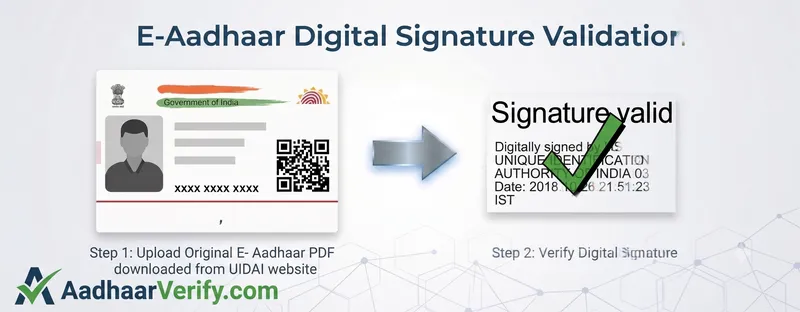
Our tool completely automates the UIDAI e-Aadhaar signature verification process. By securely uploading your file, we cryptographicly verify the signature and inject the trusted certificate path (LTV) directly into the PDF. When you download it, your PDF reader instantly validates it and displays the official Green Tick.

Why use our Aadhaar Digital Signature Validation tool?

100% Secure & Private

We respect your privacy. Files are validated using strict in-memory processing and are instantly purged from our servers.

Instant LTV Generation

Not only do we validate signatures against official NIC root certs, but we generate a Long-Term Validation PDF instantly.

No PDF software Certificate Setup

Avoid the hassle of manually trying to add trusted certificates to your PDF reader for e-Aadhaar. We embed the Aadhaar signature properties and certificate path directly into the file's DSS.

How to Download e-Aadhaar from the UIDAI Website

A quick guide to fetching your official PDF from the myAadhaar portal.

1

Visit the official myAadhaar portal

Go to the official UIDAI website at myaadhaar.uidai.gov.in and click on the Login button.

2

Enter your credentials

Enter your 12-digit Aadhaar number and the Captcha code shown on the screen. Click on Send OTP and enter the One-Time Password sent to your registered mobile number to log in.

3

Download your e-Aadhaar

Once logged in, click on the Download Aadhaar option from the dashboard. Review your demographic details and click Download at the bottom right. The official PDF will be saved to your device.

4

Verify the Digital Signature

Your downloaded e-Aadhaar PDF will initially have a "Validity Unknown" yellow question mark on its signature. Upload that PDF directly into our tool at the top of this page to instantly secure it with Long-Term Validation (LTV) and get the official Green Tickmark!

Frequently Asked Questions

Why is my Aadhaar signature showing a yellow question mark?

The yellow question mark ("Unknown Signature") appears when standard PDF software cannot find the root certificate used by UIDAI on your local computer. Our tool solves this by embedding the necessary Long-Term Validation (LTV) data directly into the PDF, so the signature is recognized as valid instantly.

How do I get a green tick on my e-Aadhaar PDF?

Simply upload your e-Aadhaar PDF to our tool. We securely validate the signature against NIC/UIDAI root certificates and return a new PDF with LTV enabled. When you open it in standard PDF software, it will show a Green Tickmark without requiring manual certificate installation.

Is it safe to upload my Aadhaar card here?

Yes, it is 100% secure. We process the file securely in memory to perform the cryptographic validation and delete it instantly after processing. We do not store your Aadhaar data.

How to fix Aadhaar digital signature validity unknown error?

The "validity unknown" error happens because your PDF reader doesn't have the UIDAI certificate in its trusted list. You can fix this manually by navigating complex PDF software settings, or simply use our tool to embed the validation data directly into the PDF for an instant fix.

What is the Aadhaar card digital signature green tick meaning?

The green tick indicates that the digital signature on the e-Aadhaar is cryptographically valid, issued by the legitimate certifying authority (NIC/UIDAI), and that the document has not been altered or tampered with since it was originally signed by the government.

How to validate e-Aadhaar signature in your PDF reader?

To validate manually in your PDF reader: click on the signature, open Signature Properties, click 'Show Signer's Certificate', and add it to your Trusted Certificates. Alternatively, use our online validation tool to automatically embed the trusted certificate path (LTV) into the file so it works instantly without setup.

Verification Process

How to get a green tick on your e-Aadhaar

Verify your digital signature and embed PDF software LTV in 3 simple steps. We build and embed native Document Security Store (DSS) certificates into the PDF structure.

01
Upload e-Aadhaar
Upload your original e-Aadhaar PDF directly downloaded from uidai.gov.in.
02
Cryptographic Audit
Our backend validates byte ranges, digest hashes, and chains to CCA India root certs.
03
LTV / DSS Embedding
Long Term Validation info is injected into the PDF's internal security objects using PyHanko.
04
Download Verified PDF
Open in standard PDF software or any PDF reader to see the genuine green tick signature.
Fail-Closed Guarantee

Built with absolute privacy & security

Designed from the ground up to protect personal identity and ensure compliance.

Zero Persistent Storage

Files are held strictly in temporary RAM-disk sessions during processing and immediately purged upon download or expiry.

Fail-Closed Policy

If a PDF is modified, unverified, or lacks a genuine UIDAI signature, verification halts immediately. No fake badges.

Automated TTL Cleanup

Active background sweepers scrub stranded sessions and temporary files after 10 minutes to prevent data retention.

Simple Pricing
₹199 49
Per verified document download • Free validity check first
Cards UPI Bank Wallets
  • Instant pre-payment cryptographic signature verification
  • Native PDF software LTV / DSS certificate embedding
  • Valid for banks, passport office, landlords, & official submissions
  • Immediate automatic file cleanup & privacy protection